Australia workshops and appearances in November

crossing signsAre you one of my Australian pals? Interested in spending time learning and talking about some shared interests? Well I’ll be down under for nearly three weeks in November.

Matt Moore of Innotecture and Carol Daunt Skyring have set me up with a roller coaster ride of events, some of which are open to the public and you can register for them now. So here is the run down (there will be a trip blog!)

You can get all the workshop topic and registration details on the Matt sponsored workshops in Sydney, Canberra and Melbourne here –> Nancy White in Australia

You can get the details on the Carol sponsored workshops and conferences here .

  • Sydney Nov 9th – 2 half day workshops 1) Stewarding Technology for Communities 2)  Graphic recording/facilitation.Hands on, messy fun.
  • Sydney Nov 10th – 2 half day workshops, Introduction to Online Communities and Advanced Online Communities with Matt Moore. Sydney events will held at the Australian Technology Park in Redfern.
  • I’m open and available on the 11th in Sydney. For play or work or both!
  • Canberra November 12th  – 2 half day workshops, Introduction to Online Communities and Advanced Online Communities with Matt Moore. Canberra events will be held at ANU University House.
  • Adelaide November 13th keynoting E-Dayz 09 Day 2 (Thanks to Michael Coghlan)
  • Gippstafe on the 16th with Brad Beach’s group of advanced online facilitators.
  • Melbourne November 17th – 2 half day workshops, Introduction to Online Communities and Advanced Online Communities with Matt Moore. Melbourne events will be held at Abbotsford Convent.
  • Mooloolaba, Sunshine Coast Learning Technologies  Conference and Preworkshop, Nov 17- 19. I’ll be keynoting the conference and running a pre-conference workshop. I’m available for play and/or private groups/consulting on the 20th if you are interested. Let me know!

Hopefully there will also be informal gatherings, tweetups  and the like! G’day!

Don’t know where this is going…

Chris Lott posted a really important bit at the end of his overview of Alan Levine’s OpenEd09 presentation on Alan Levine’s Amazing Stories of Openness. And lest I forget, don’t miss the recording of Alan’s work. It is… well… AMAZING! I was lucky to be part of the project with two stories of my own, told by candle light outside a Hawaiian beach bar!

The video of the session is great too, because Alan is always engaging and funny. At the end of his presentation he made a comment to the effect that he “didn’t really know what these stories led to.” But that’s the beauty of the shared experiences: they don’t lead to anything. In the same way that we don’t have conversations at a table (or tell stories around a campfire, virtual or not) and wonder where they will lead. Those stories are the destination… those experiences are what it is about.

A bell rang when I read Chris’ words harking back to EdMedia in Hawaii this June. Alan again gave an incredible presentation on “50+ Web 2.0 ways to tell a story.” During the Q&A I asked Alan what I think turned out to feel like a harsh question. I asked what he knew about people’s USE of all these ways of digitally telling a story? What did it matter? How was this wonderful set of possibilities put to use? He replied something to the effect of Gee, I don’t know. I never asked that question. (my memory, not a direct quote!)

I squirmed in my seat, feeling like I had put Alan on the spot. At the same time, I worried about what we preach when we are all excited about something, about the signals that sends out. Does seeding possibility matter? Does fostering hopefulness? Something really stirred but I did not pursue it.

Then Chris comes along and helps me remember about the power of NOT having a destination all the time. Of things that don’t, at least at first “lead to anything.” Amen! Yeah!

Then I read Chris paragraph again and went WAIT A MINUTE!!! Read it again…

But that’s the beauty of the shared experiences: they don’t lead to anything. In the same way that we don’t have conversations at a table (or tell stories around a campfire, virtual or not) and wonder where they will lead. Those stories are the destination… those experiences are what it is about.

I have to pull two things out. Of course, stories are destinations. But shared experiences don’t lead to anything? WHOA! Yes the do!!!! To me, this is the power of Open Education. Of informal networks and communities of practice.  Shared experiences lead to the kind of learning that often rocks my world.  They just aren’t usually directed. We don’t have a plan for them. Yet.

So in the end, yes, often we don’t know where we are going. But dang, we ARE going somewhere. What matters is paying attention.

Phew, I’m glad I got that off my (very congested, noisy) chest!

P.S. I got sick this week and was unable to drive up to Vancouver BC to OpenEd09. (And no one would have wanted to get near me!) But thanks to an active Twitter stream (cool early analysis here) and live/recorded videos of every session (beautiful organizing, team!) I was able to benefit from much of the content and conversation. Yeah, I missed the beer. Yeah, I missed seeing my friends. That  can’t be replaced, but for a distance experience of a F2F conference, this was one of the best. I should probably write a whole post on this, but tomorrow I join up with my Future of Learning in a Networked World pals to continue the FLNW09 road trip. I missed today – kayaking on Bowen Island – due to this wretched bug I have. If you are on Washington’s Olympic  Peninsula, ping me. You can join us for an hour, a day, etc!

Photo Credit: ManojVasanth on Flickr

10th Anniversary of the OnlineFacilitation Group

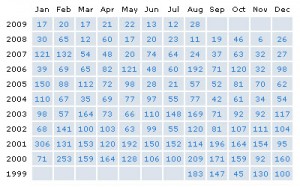
Little did I know when I started a Yahoogroup for online facilitators in 1999 that our little band of fanatics who gathered to share kinship in a little known field would survive 10 years. In ten years we have grown to nearly 1600 members (though I suspect there are a lot of dead emails!), and many ups and downs in volume. As you can see, things have really tapered off the past few years.

onfacmessagehistory

When we started, there were very few places to talk about facilitating online groups and communities. Now there are  groups springing up all over, and some steadfast old-timers as well. Our conversations are spread out over various social media, as it should be.

Last week I asked people to share some stories about their involvement with the group. Here area  a few. I am a little embarrassed that some were more thank you’s than stories. All I did was start the group. But nonetheless, these also brought a smile to my face.

To: onlinefacilitation@yahoogroups.com
From: “pattianklam”
Subject: [of] Re: 10th Anniversary of OnlineFacilitation Yahoo Group Aug 12th – share your story

1999 really was a pivotal year. Cluetrain Manifesto, first articles on KM and social network analysis (Rob Cross and Steve Borgatti), Communispace founded, Blogger released … a real cusp. Congrats, online-facilitation (and especially Nancy) for providing space for pioneering.

To: onlinefacilitation@yahoogroups.com
From: “Kathleen Johnson”
Subject: [of] 10th Anniversary of OnlineFacilitation Yahoo Group Aug 12th – Katrina Relief

Inspiration from this group is what started me volunteering in the aftermath of hurricane Katrina. I came down to Mi8ssissippi to volunteer for a couple of weeks and ended up staying here for going on four years.

I had online groups prior, and that is why I joined this group – so that I could work on the exploding virtual world of communication.

And that is what has driven my work here in Mississippi in the aftermath. I started gutting out homes and now I operate a multi-million dollar non profit that started with an application in late 2005. More than  20,000 volunteers later, 536 homes, and working across Mississippi
and Louisiana – primarily in disenfranchised communities working with private corporations and a FEMA contract for a pilot program for Case Management – we have moved mountains.

What has driven all this? An online group and a website and very few dollars for marketing.

What has inspired me? Nancy and her eloquent gift of language, networking skills,  and her never ending spirit to reach out and keep giving.

Nancy – thousands upon thousands in Mississippi have benefited from your gift of your volunteer work to this Yahoo Group and other sites you work tirelessly.  They have reached out across a virtual world and made this volunteer engine work in Mississippi.

I am inspired by you, in awe of what you have accomplished, and most of all I thank you.

Kathleen Johnson
Waveland Citizens Fund 501 (c) 3
Katrina Relief
Waveland, Ms.
http://www.reliefvolunteers.com <http://www.reliefvolunteers.com>

To: onlinefacilitation@yahoogroups.com
From: Tony Carr
Subject: [of] More birthday thoughts

Hi Nancy and colleagues,

I really that my earlier post was far too understated. What I really  want to say is that this has been a list that can profoundly change  lives and practices and ease communication across an increasingly  dispersed community of practice. A large part of this has been the warm,  relaxed facilitation, generosity, and commitment to reflective  conversation which you have exemplified, Nancy.  For several years into  this decade I found onfac to be my significant single communication and  networking resource concerning online facilitation. Whether it was for
information about online conferences, volunteering opportunities, online  facilitation courses, or conversations about practice this was THE place  to be! During the last few years I have shifted my attention towards  online facilitation information and conversation available through blogs  and rss including your wonderful blog. It sounds like this has been the
experience of several people here so there is an ongoing conversation  about the role of e-mail lists in the current knowledge ecosystem.

Best wishes
🙂
Tony

To: onlinefacilitation@yahoogroups.com
From: “Olubodun Olufemi”
Subject: [of] Re: More birthday thoughts

Hi Nancy,
It has been ten years and time indeed flies. I joined this group sometime in the past (I cannot remember when) and have been very happy to see a forum that has been helpful in increasing my knowledge on a wider range of topics. It has been to me information source fo a number of free courses and online events which I have spread to many friends.
I am proud to  identify with this group and sincerely hope I will continue to retain my membership of it as well as encourage friends from my country Nigeria to join.

Best wishes to this community and the initiator

Olufemi O.J.
University of Lagos, Lagos Nigeria.

To: onlinefacilitation@yahoogroups.com
From: Jane Horan
Subject: [of] Re: more birthday wishes to Nancy and the group

Reading through Tony’s posting jarred my memory with this community & Nancy White…..

My first adventure with the online world was throught the Fielding Institute (1997-1999) – for me, the online learning experience was extremely powerful and I wanted more.

After graduating from Fielding I was looking to replicate this experience and I came across Nancy White.  I participated in one of the early classes (I think in 1999) with Nancy & Michaela – which led to another class with Michaela and George Simmons on cross cultural groups, and eventually to an online collaborative study with INSEAD, IBM and others to examine e-learning.

Similar to Tony, I also participated in a WEB CT trial with the education department at Bristol University.   Funny, how things come full circle, I’m now a PhD student at Bristol (and still living in Asia).

While I’m not an active participant, I have always found this online facilitation group to be a wonderfully supportive community of like minded individuals – with a great mix of discovery, insights and trends.    When there was talk of ending this group or migrating to a different platform – my heart sank.   Some read newspapers (online), I read postings from all of you on a regular basis.

Thank you for bringing this group together, Nancy and thanks for 10 great years of sharing!

Jane Horan
Singapore & Hong Kong

To: onlinefacilitation@yahoogroups.com
From: “kksantacruz”
Subject: [of] Happy Birthday!

Hi Nancy,

Happy Birthing Day and thanks for creating and maintaining (the really hard part!) such a stimulating, friendly and forward looking group! Thanks fellow members for providing the good thinking and goodwill that make this group unique in my experience.

Best,

Kathy Kelly
Collaboration Specialist
Intuit, Inc.
member since 2000

To: onlinefacilitation@yahoogroups.com
From: Barbara Steinberg
Subject: Re: [of] 10th Anniversary of OnlineFacilitation Yahoo Group Aug 12th
– share your story

Wow. I was a member from the very first day. Does this mean I’m getting
old? nooooooooooooo. I’ll be 29 next year. 😉

Congrats Nancy.

B

To: onlinefacilitation@yahoogroups.com
From: Anne Papina
Subject: Re: [of] 10th Anniversary of OnlineFacilitation Yahoo Group Aug 12th
– share your story

Wow, congrats!  I hardly post these days, but I’m still around … probably have been a member for most of those  10 yrs…. still enjoy reading the group, just not as closely as the old days… you’re right about having too much to follow now!

take care
Information overload and Beth’s tips

Flickr creative commons image by verbeeldingskr8I guess I was overloaded yesterday and missed Information Overload Awareness Day! Thankfully, Beth Kanter wasn’t. Take a quick hop over to her tips. And don’t be overwhelmed by the number of the tips. (Little evil grin)

Today is Information Overload Awareness Day.  The purpose is to call attention to the problem of Information Overload, how it impacts both individuals and organizations, and what can be done to lessen its impact.

Here’s one way you might celebrate.  Take my information overload quiz.  Look at your score and ask yourself the following reflection questions.   Then pick one idea to reduce information overload in your life from this list.

I don’t know what shifted, but in the last four months, I seem to be able to let more of the “information stream” pass me by without becoming worried. I take that as a good sign. But this fear, this sense of having to “master” it all is common amongst peers and clients, so having a strategy is important.

Photo credit: verbeeldingskr8

The social media I use

intersections and configurationsRecently I wrote a post that received a lot of attention – more than I would have expected: How I use social media. At the end of the post, I promised to write about WHAT social media I currently use. So here it is.

I tend to think of the constellation of tools a person uses as their configuration of tools. It is both what they use, how they use them, and how they fill the range of needs as a whole.  I have saved a few delicious tags about individuals’ technology configurations  (DEAD LINK, BuhBuy delicious.com) if you want to browse with they use.

I started making a list of all the social media I use.  I realized there is an important distinction between the media I use regularly, and the media I try, dabble and experiment with. Part of my work requires me to do a lot of experimentation, so I have accounts on scores of social media sites – more that are forgotten than are used. So I want to focus on the tools I use regularly, the tools that make a difference in my work.  Now some of you may say a few of these don’t qualify as “social media” – old school things like email. I’m including them because I think social media predates the label. 😉

I also wondered if it would be worth organizing them in the categories of “use” I used in the previous post. This would clearly create duplicates, so I resisted that impulse. There would have been too much tool duplication across each of these:

  • Learning
  • Getting work done
  • Finding and connecting with people
  • Getting stuff (search, content, etc.)
  • Exploring and pushing my own boundaries

So here are the tools.

  • Email
    • Eudora (business, family and close friends) – Eudora was my first email program and you know how it is, you get used to something. Eudora is no longer a paid product, now Open Source. I am not an Outlook fan. What can I say?
    • Gmail (two accounts, one to back up my Fullcirc email and one for everything I don’t want in my main in box.) I considered moving all my email to Gmail but decided I don’t want all my eggs in one basket. However, most of my email lists and social media accounts use Gmail so I can keep my other inbox manageable. This has made a BIG difference in the efficiency and effectiveness of my email practice.
    • I still have a Yahoo mail account and perhaps a hotmail account… who knows?
    • Old fashioned web access from my ISP for when nothing else works (always have a back up) – When you depend on email and the internet, you want more than one way in. I also still have a dialup service I can use on a per minute basis but knock on wood, I have not used it in years.
  • Browsers
    • Firefox – my day to day browser, but I have weeks where I trip on over to Chrome. I haven’t opened up IE in months.
    • Chrome – because I can…
  • Blogging
    • Word Press plus plugins – A friend (thanks Jon!) helped me set this up and I have been very very happy.
    • (I used to use Blogger). I left Blogger unhappy. I hosted my own blog and had mountains of FTP problems, and from the forums, I was not alone. Never got a stitch of help from Blogger. That was the end of what once was a happy relationship.
  • Microblogging
    • Twitter – I want to look into Laconi.ca because I’m getting more and more convinced that decentralized apps are the way to go if you want resiliance.
    • Twhirl as a Twitter desktop client because I find Twitter on the web tiresome.
    • Tweetdeck when juggling Tweets at events, hashtags. Otherwise it is too much and it hogs a lot of resources on my older desktop computer.
  • IM and VoIP
    • Skype (chat function might be listed as a tool unto itself. I’ve abandoned MSN and AOLIM.) What would I do without Skype? I work with people all over the world. The free VoIP, the presence indicators, the chat, file transfer, etc. –> central application for me, second only to email.
    • VOIP phone service with a web interface provided by my ISP. I can pick up my voicemail via the net or via email, transfer calls away from home etc. I also get unlimited long distance in North America and certain European cities, but I still use Skype.
    • HighDef Conferencing (paid service) for large audio meetings because it scales well and allows entry by both Skype and telephone and has some local numbers in other countries. I have global networks and groups!
  • Chat
    • Skype
    • Etherpad but I sure wish you could have more than 8 people on at a time or that they had a paid hosted service. It is a sweet combo of real time wiki and chat room that pairs great with a Skype call or telecon.
    • IRC (yeah, still IRC!)
    • Google Talk sometimes
  • Co-writing & Publishing
    • Google Docs has become my primary shared writing and spread sheet space. I need to try Zoho ! (See here for more alternatives. I don’t know about you, but I get worried when I rely too much on one company. So much for integration, eh?)
    • Wikispaces and other wikis, including MediaWiki. I am a wikispaces fan girl for sure! Easy to use. I also like PB wiki, now called PB Works
    • Etherpad (also for chat during audio calls)
  • Live meeting tools (Often I don’t have a say in what is used.)
    • Elluminate – a paid service, but worth it when there is budget. You can get a free 3 person room to try it out. I like it because you can devolve controls way out to participants and have multiple moderators. WebEx and Live Meeting— take note! I am floored the MS Livemeeting does not have integrated participant chat.  You can only chat with the moderators. I am not into top down controlled  online meetings, thanyouverymuch!
    • Dim Dim (I’ve only used the free version)
    • Vyew – free, visually a bit messy, but works well for small groups.
    • Adobe Connect – quite a few of my clients use this, especially in the academic realm. I’ve never managed it, but it was a pleasant experience using it.
  • Images
    • Flickr (including third party Flickr toys) – I love flickr. I love the ease of posting my pics, of finding  creative commons pictures to use from other Flickrites and the general sense of camaraderie that emerges around images. Damn cool!
    • Picassa and Picassa web albums – I manage and edit photos with the desktop application and then use Picassa when I want to easily, more privately share pictures. I use this a lot with my clients.
    • Picnik and Snagit (hm, where does the line between software application and social media sit?) for capture and editing.
  • Aggregating
    Because I don’t want to use just one integrated set of tools and because setting content free and making it useful to others are two core practices of mine, tools that make it easy to syndicate and aggregate are essential. Even if I never fully understand how they work! These all leverage RSS.

    • Bloglines
      – where I subscribe to and read blogs. Alas, I’m spending less time reading. Where does the time go?
    • iGoogle – nice as a start page, especially for when I’m on the road.
    • Netvibes – another nice start page tool that I am using less since iGoogle. I’m fickle.
    • Feedburner – to help manage the feeds FROM my blog.
  • Conversational, content management  and “Learning” platforms
    This is a very messy lump from a technology standpoint. It used to be that online events and work spaces were very tidily held within one application. Then these tools were stand alone and indispensable. Now it seems I use part of them – the part that works well – and I often ignore the rest. For example, WebCrossing has a fabulous email interface for when I need web based discussions that can be used offline for low bandwidth settings. The rest I can ignore. Moodle, while pretty visually ugly, is easy to set up and is fabulously open source, as is Drupal.  And despite rumors to the contrary, email lists are alive and well and in fact critical in low bandwidth settings.

    • Moodle – open source “learning management system” but I use it simply as a collaboration space. Please, someone tell them to improve their blog structure!
    • Webcrossing – known fondly by some of us oldtimers as the cockroach of online conferencing as it just doesn’t die.
    • Drupal – powerful open source content management system. Know what you are getting into and it can do a lot, or use specific pre-configured packages such as the Social Media Classroom.
    • Yahoogroups – oldie but a gooie.
    • Googlegroups
      – my more technical groups prefer this over Yahoogroups and I can’t seem to figure out why, but it is consistent feedback.
  • Bookmarking
    I am a bookmarking addict and to be frank, I’m not sure why. I think I’m afraid I’m going to miss or forget something, but truth be told, I don’t use my bookmarks once I’ve created them!

    • Delicious
    • Diigo – I particularly like that you can bookmark on Diigo and set it to automatically add the bookmark to delicious. However, I use it less because it appears to be down more than delicious.
  • Video
    I don’t use video much – nor as much as I might like to. I get content on Youtube but prefer posting on Blip.

  • Music
  • Filesharing
  • Social Network  Sites
    • Ning – not so much that I would choose it, but many of the groups and networks I belong to have chosen it. I specifically dislike the content-empty email alerts. You have to click in, sign in and then find out the message wasn’t of interest. Ick. Also, there should be more ability to link between Ning communities, IMHO.
    • Facebook – more because many people in my life use it centrally and if I want to be connected to them, I have to play the game. Otherwise I would probably avoid it.
    • LinkedIn – I use it again because peers I care about do. I think I’m pretty well linked in already! 🙂
  • Mindmapping
  • Other Stuff
    • Carbonite back up (I include it because I learned about it from my network!AVG Anti virus would fall into the same bucket. I have both a local and online backup. Yup, back it up friends, back it UP! If
    • TinyUrl.com
    • Google translate (used to use Babelfish)
    • Wordle because it is visually fun and easy to make tag clouds. It is a lazy way of making discussion summaries as well. Shhhh… don’t tell!

What is YOUR configuration? If you are a technology steward for a community, how does your personal configuration inform the configuration of the community?