Getting used to online interfaces

We are into our second week of the FAO/CGIAR Knowledge Sharing workshop (the first, online phase of 4+ weeks) and I was struck by a conversation in one of our mentors learning logs (we each have a space for journaling.) Alexandra (who logs in as Maria Jorge) has come back after taking the first version of this workshop earlier this year to be a mentor. Joined in this conversation copied (with permission) below, is Michael, another past participant returning as a mentor, and Gauri, who moved from past participant to co-facilitator!

Maria Jorge – Friday, 5 September 2008, 03:57 AM

Hi all,

I think this second time (I participated already in the first KS) I am more excited about interacting with people and benefit from their experiences… I also want to browse through the moodle and learn a few extra tools. I hope to have time over the weekend to explore this more.

I like the new look of the moodle! The idea of having the list of facilitators and participants timezone and city all together is great, it gives a sense of group, of ‘room’ where everybody is together. Thanks for the improvement!

Great to see so much enthusiasm and interaction already!

Nancy White – Friday, 5 September 2008, 03:55 PM
I’m giggling, Alexandra, because I don’t think we changed much at all in the moodle. In fact we exported everything from the old workshop, reinstalled it here, then just pulled out the old discussions!! What seems different?

Michael Riggs – Sunday, 7 September 2008, 09:41 PM
Alexandra, I felt the same way! I liked the “new and improved” Moodle site for KS2 when I first logged in last week. It seems much easier to get around. So much so I went back to the KS1 site to see what had changed … and realized, as Nancy says, not much! I guess the site became more familiar through the process of KS1 than I had realized, and now navigating around seems quite straightforward. Chalk one up to experience.

Maria Jorge – Monday, 8 September 2008, 02:19 AM
Hi Michael,
Thanks for sharing your impressions too, so I do not feel so weird… I guess we learn more than we realized and some issues become ‘naturally’ familiar without us noticing. I think that the idea of a week zero (i.e. extra time to browse around without much extra commitment) was good (I don’t remember this in the first KS but perhaps there was that too and I do not remember…? I started a bit late so perhaps is that what I missed then?
Regards
Alexandra

Nancy White – Monday, 8 September 2008, 10:58 AM
I would love to “quote” this conversation on my blog if you two would be comfortable. It is a PERFECT example of what changes when we get used to a tool and it starts to disappear into the background.

Alexandra, you are right, “week 0” is new. Remember that first call in the first workshop where we tried to both cover the technology and begin substantive conversations? It was a MESS!!!

Gauri Salokhe – Monday, 8 September 2008, 12:22 PM
I can only second what you both have observed. The second time around it does seem easier to use and navigate. In terms of main page (central part) there is one difference – we have tried to put all the weeks’ main activities right at the top. In week 1, we only have week 1 related information and week 0 information is removed and placed elsewhere. In my case, this helps me navigate the space better.

What I also observed is that as a participant, the constant flow of emails seemed overwhelming but as a facilitator I am excited that there is so much happening, especially happy to see that there is so much interaction between participants and everyone trying to help each other.

Maria Jorge

Nancy, you can use our conversation for your blog. No problem!

Michael Riggs – Tuesday, 9 September 2008, 01:41 AM
That is OK with me Nancy.

Two things surface for me here.

  1. Use over time should make things easier. As we master a new interface (no matter how difficult or simple) it should fade into the background so we focus on interaction and content. Design has a lot to do with how fast this happens, as does frequency of use and individual preferences.
  2. Our role impacts are experience of the platform or tool. Obviously when we design something, we have deep familiarity. But when we have a specific role, we approach the platform with different eyes. Facilitator, mentor, participant, designer. So not only does this harken back to my old saw “designed for a group, experienced by an individual,” but it suggests that we may adapt faster if we have a specific role to play.

What do you think?

Edit on Wednesday – Gauri shared some of her reflections on her blog. And I continue to ponder this not only from a “workshop” perspective, but from an ongoing communities of practice perspective.

Communities of Practice Series with Darren Sidnick #1

I mentioned a while back I was guest blogging on Darren Sidnick’s blog on communities of practice with an emphasis on the current interests of folks at his company, UFI Learndirect. Darren said it was ok to repost these on my blog, so I’ll be including one about once a week for the next 10 weeks. Here is number one, which ran on Darren’s blog in August. Darren Sidnick’s Learning & Technology: Communities of Practice (CoPs) with Nancy White

Part 1part 2part 3, part 4, part 5part 6,  part 7 ,  part 8 , part 9 and  part 1o  are all here on the blog.

Communities of Practice (CoPs) with Nancy White

Darren wrote: This is a series of blogs on Communities of Practice (CoP). I’m excited as I’ve teamed up with CoP guru, Nancy White http://fullcirc.com/wp/. Nancy is a regular keynote speaker on the conference circuit and expert practitioner. For me, it’s like getting on the same football pitch with Manchester United’s Ronaldo (or should I say my favourite football player Paul Gascoigne! I’m a Tottenham Hotspurs fan).
Nancy is writing, while I’m editing and doing the odd football/soccer trick (ie. doing a bit of writing). CoP is a hot topic in Ufi learndirect at the moment and an area we are piloting and testing. For me, Communities of Practice take love and attention to get right! They are about people and communities, not about technology or platforms. Anyway, here’s blog 1……………
What is a Community of Practice and Why Should I Care?
You’ve probably heard the term bandied about … “communities of practice” … and in the same breadth someone says “the email list” or the “website.” So what the heck are they talking about and how can a piece of software be a community? Read on…

What is a community of practice?
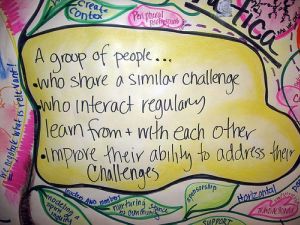
I like to start with the definition of a community of practice from the guy who coined the term, Etienne Wenger. Here is his definition. Note the last part – that is the important part:

Communities of practice are formed by people who engage in a process of collective learning in a shared domain of human endeavor: a tribe learning to survive, a band of artists seeking new forms of expression, a group of engineers working on similar problems, a clique of pupils defining their identity in the school, a network of surgeons exploring novel techniques, a gathering of first-time managers helping each other cope. In a nutshell:

Communities of practice are groups of people who share a concern or a passion for something they do and learn how to do it better as they interact regularly.

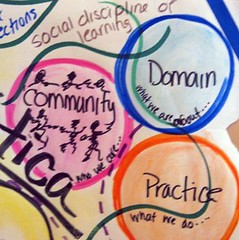
There are three important things in this definition: groups of people (community), domain (a passion for something) and practice (do it better as they interact regularly.) CoPs are not one shot deals that happen at meetings or conferences. They grow and develop over time. In subsequent posts, we’ll talk more about community, domain and practice – because they can be really useful terms as we think about launching and sustaining communities of practice. (CoP).
How are CoPs useful in learning?

But first lets get practical and think about the role of CoPs in eLearning. How can CoPs enhance learning?

  1. They offer the chance to making meaning of our learning as we apply it to our lives/work/tasks. When we learn something in a course, it can go in one ear and out the other. You know the old adage of the power of application. Even more powerful is how much we learn when we have to teach someone else. So the sharing of the application – what is working or not working, asking for help and teaching others what we know – makes our learning in a community of practice deeper and longer lasting.
  2. They connect us with people who can be resources for continued learning, opportunities for practice or even job leads. Communities can offer people access to networks which are particularly important if their learning is to support employment.
  3. They allow us all to use our expertise. The “teacher” or the course content may be the initial source of learning, but the learners themselves can be great sources of knowledge. Communities of practice may create things that capture and share their learning. They may bring in local context that deepens the learning. Together we know more than any one of us alone.

Wait a minute!

So does that mean you should rush out and start a CoP? It all depends… We need to ask ourselves a few questions before we go “launching a community” because CoPs are not always what we need. And that’s ok. So here we go:

  1. The value to participants. Is there a group of people who want to and will interact and learn together over time? If not, maybe there is another form we should be looking at, such as a network. Or a site where people can go for related content. Communities have to be of enough value so people will take the time and effort to participate.
  2. Time and access. Do these people have the time and access to interact, particularly online since we are talking about an e-learning context? Are they already meeting face to face – and if yes, do you even need the added online layer? If not, don’t bother!
  3. Is there an existing CoP that fills the need? If yes, think hard before you try and create a new community. It is easier to build on what exists than to start from scratch AND compete for attention.
  4. Support. If there is a group of people who want to learn together over time, is there sufficient conditions to nurture the community such as leadership and facilitation? Online CoPs , we’ve learned, really benefit from facilitation. Is that in the plan and the budget? If not, think twice.

The tool is not the community
If you still think a CoP is useful for your context, let’s clear up one more issue. Web based tools, sometimes called “Web 2.0” tools allow us to “be together” as a community even if we are not in the same location. The internet has radically reshaped what a CoP can be. But it is VERY IMPORTANT not to confuse the community with the platform. Communities are made up of people. Platforms support their interactions. Just because you provide a platform does NOT mean you will auto-magically have a community. But these tools will allow you to support people connecting across distance, allowing a greater diversity of thought which can enrich a community. They allow communities to share what they know and connect to other communities and the world, which can deepen their learning. So technology has become an important part of the community toolkit.

If you are already using CoPs for yourself or for your learners, leave a comment here and tell a story or share a URL … how is it working for you?

Want to know more about Communities of Practice? Here are some great resources:
Product selection with your network

Steve Crandall\'s old Western Electric handset updated with a modern speaker and microphone.  There is a switchable bluetooth/usb link to the MacBook Pro.  Charging is done using a usb connection.  Built 2005.I have a tendency to destroy my computer headsets/mics with regularity. I run over the cords, the plugs loosen and then the sound degrades. It is time again to buy a new set, but instead of buying the cheapest set at the local office store, I decided to get the recommendations of my network – since many are also frequent users of this product.

Here is what I learned.

Now all I have to do is make up my mind. That is always the hard part and the downside of research. But the fact remains that with a less-than-140 character question, I got quick, actionable feedback. Think about that in terms of knowledge management and knowledge sharing!
Photo:
Steve Crandall’s old Western Electric handset updated with a modern speaker and microphone. There is a switchable bluetooth/usb link to the MacBook Pro. Charging is done using a usb connection. Built 2005. (Thanks, Steve, for letting me use the picture!)

Visual thinking and being funny

Lee LeFever blogged about this great video and I had to pass it along. As a passionate student of visual thinking and one who appreciates the performance aspect of presentations, take a look at this video by Demitri Martin

For those of you who think you can’t draw and use visuals to communicate your ideas… think again! And  hopefully this will all tweak us to think about our slide decks!

(warning – this is stand up comedy, so some of it might be offensive to some of you!)

(Oh, and yeah, the category is  Monday videos, but I like to break out a bit!)

Onramps to online engagement

Rambly post alert –  this one hops all over the place with little regard to coherence.


DEANZ 2008 - Workshop Discussions

My friend Mark Hammersley reminded me a few months ago of a tool to help surface intercultural issues and build trust in distributed teams. One was Thiagi’s Multicultural Email Game. (Mark notes it is also included in the “Building Trust in Teams” toolkit, PDF for free or you can buy the book, published by Oxfam www.oxfam.org.uk) I have not used this game and would like to try it – and not just at a F2F meeting, but try it online. It could be tricky because it actually asks participants to trust the process of the game right from the start. But the idea of a game appeals to me, not only for trust building, but as an on-ramp to engagement. Michele Martin shares some of her favorite ice breakers (mostly F2F) which are another way of initiating engagement. Check the comments on the post for more ideas.

So why am I focusing on onramps to engagement today? Two reasons. The first is I’m a guest in a South African workshop on elearning for educators in higher education and almost ALL of their questions have to do with engagement.  Most often, “how do I get people to post on discussion boards.”  They are also dealing with huge cohorts that blow my mind. How does engagement scale? Wow. I’ll have to save that for another post.

The second reason engagement is top of mind is because  I was Skyping with a colleague who is facing challenges getting some organizational partners to participate in a discussion forum. In our conversation we talked about three big barriers. Maybe they will stimulate you to contribute some more issues and ideas.

Why are we talking about discussion forums?

Engagement is an issue with all tools. Tools are the medium to achieve our purpose.  It just so happens today people were talking about discussion forums. It is still critical to ask the question “why are we using discussion forums.” Again, I won’t go into that today. So let’s take it as a given just for fun, ok?

Barrier 1: No Shared Context for Learning Together

One of the possible barriers we identified was the different cultural contexts for sharing work in progress as a way of learning. I have found that people often think what they observe and experience won’t have value to others. That their stuff, their “work in progress”  is not ‘good enough.’ So one suggestion is to create an example or trial run, and wrap it in an invitation that has relevance and value to the participants. To role model the value of thinking together while working, not just when we are done. This begins to help us see where we have shared and different contexts and how these can add to, not subtract, from our learning.

For example, recruit 2 people from the group – one who is willing to share her workplan (this is what is under discussion) and another to interview the first person with you, the facilitator. Prior to posting, spend some time with person one to see if they need any help preparing the document and give them some feedback about the value of the work. There is always value, trust me. But sometimes we are blind to our own learning and strengths. Then spend some time with the interviewer brainstorming questions. DON’T practice the interview. I find that often saps the life out of things. But prep the initial questions and give tips on how to interview and dig down for the gems rather than just coasting on the surface.

Then create an invitation to the rest of the group to a time delimited interaction. In this example, it is on a discussion forum due to bandwidth limitations.  In the invitation, use language that is relevant to the participants interests and needs, such as “come participate in a peer interview with Person 1 and Person 2 where we’ll mine for the gems in a work plan. Get ideas and different perspectives on the work plan process.”

After this interview, do a quick debrief. What did people learn? What did they like about the process? Not like or make them feel uncomfortable. This can surface both focus, technological and cultural issues. Adjust and then encourage others to take a turn their your plans and getting valuable peer feedback.

The debrief, as was cited in the Email Game link above, is the critical part. Without this you have no feedback to adjust and improve. Without the reflection on the process, many of the participants may speed past their own learning and the possibilities of the conversations and learning with others. The “I don’t have time to post on discussion boards.”

Barrier 2: Technology

Wait, I said we were taking forums as a given for this post? Well… maybe not, eh? I work a lot in international contexts where there is little bandwidth equality. Or even electricity parity. Some members are lucky to get online on a patchy dial-up once a week, while others are always on with broadband. A portal or forum tool may just not cut it when it takes 20 minutes to download a page – and worse when that page has no value.  Organizations sometimes deny this, but it is real and the sooner we adjust our strategies, the better. So one of the suggestions we talked about on our Skype chat today was the bridging of technologies, specifically text on mobile phones to alert or focus on key web based interactions. It is probably not yet realistic to replace all web interactions – not everyone has web enabled mobiles, but this linkage with the commonly shared tool of mobile phones recognizes the realities of those with less web access and includes them more fully. It is easier to say yes to a text than that 20-minute loading page.  So the message to organizations who insist that everything happens on their portal should look again. Rethink the centralized strategy because it is not inclusive in many cases.

Barrier #3: Organizational Foo

Finally, we come to the fun stuff. The elephants in the room. Our own organizational blinders and shortcomings. For example, funders have power over their grantees, so grantees do what they need to to “tick the box” but do they feel ownership of their learning in an experience with a funder, or beholden to the learning agenda of the funder? What real and meaningful roles are available to people? What ownership? Like the tool choices above, the power of the convenor can stifle the engagement of everyone else, especially if their power is disproportionate.

To address these issues, we have to look inward to our organizations and ask the hard questions about our values, how we lead and follow, how we prioritize our time and what we ask of others. If we are asking our colleagues to participate in a web based interaction, we should not dare to refuse to participate ourselves. If we choose technologies that are for our convenience, we should also struggle to master those that are convenient for others. It is a two way street.

Broader issues: Training, Performance Support and Learning

So now, this spreads out to something I’ve been following others on – how we think about learning in the workplace. Is it training? Is it performance support? Is it formal or informal learning? Or better, what should we be pulling out of the bag when? This actually links back to the question, why are we seeking engagement?Yes, for learning, but for what? Why? For whom? Are we being strategic? Are we deluding ourselves that people have time for these distributed, online learning conversations in the first place? Purpose is always first and foremost, but we still slide by it with vague answers. Or we forge ahead with training, performance support or communities of learning and practice without asking about purpose.

If our purpose is clear, then what is the relationship and strategy around training, PS and learning? Too many questions and it is time to go make dinner. How was that for an easy out? 😉

Other people blogging/thinking out loud about this:

Edited to correct some bad spelling boo boos